

Engineering for the Airport: A Guide to Designing Reliable Aviation Printers (Part 2)
We are continuing the series from “Engineering for the Airport: A Guide to Designing Reliable Aviation Printers (Part 1)“.
5. Electrical Design and EMI/EMC Mitigation in Airport Environments
The airport terminal is a hostile electromagnetic environment. A single check-in counter or gate podium packages a dense cluster of electronic equipment into a confined space: passport scanners, document readers, check-in monitors, baggage scales, payment terminals, and multiple printers.
Designing the electrical subsystem for an aviation printer requires careful planning to prevent electromagnetic interference (EMI) from disrupting nearby critical systems, and to protect the printer itself from external noise.
Power Supply Ruggedness
Airport mains power can be surprisingly unstable due to the heavy inductive loads cycling throughout the facility (such as baggage conveyor systems, large HVAC units, and terminal escalators).
- Transient Voltage Suppression: The internal power supply unit (PSU) must feature robust transient voltage suppression (TVS) diodes and metal oxide varistors (MOVs) to clamp voltage spikes originating from the grid.
- Inrush Current Limiting: Because multiple devices on a desk are often tied to the same power strip or circuit breaker, the printer’s PSU must strictly limit inrush current during the critical 10 second boot sequence to prevent tripping breakers. While being able to handle the extra current needed when printing.
Radiated and Conducted Emissions
To maintain compliance with international standards (such as FCC Part 15 Class B and CE EN 55032), the printer’s high-speed digital electronics and switching regulators must be meticulously shielded.
- Ground Plane Integrity: Maintain a solid, unbroken ground plane directly beneath high-speed data lines (such as the processor bus and print head data lines) to minimize loop areas and reduce radiated emissions.
- Ferrite Chokes and Shielding: Internal wiring harnesses, especially those driving the high-current thermal print head (TPH) and stepper motors, should utilize integrated ferrite cores. The main PCB must be enclosed in a grounded metal shielding cage if the printer outer chassis is constructed of polycarbonate or ABS plastic.
- Electrostatic Discharge (ESD) Protection: Airport staff and passengers walking across synthetic terminal carpets generate massive static charges. Touchpoints such as the paper feed button, the media tear bar, and the interface ports (USB, Ethernet, Serial) must be rated for at least 8kV contact discharge to 15k air discharge according to IEC 61000-4-2.
6. Communication Interfaces: Legacy Ports to Modern IP Networks
Aviation printers inhabit a transitional space where decades-old legacy infrastructure coexists with modern cloud based airport systems. Your hardware interface panel must bridge this gap seamlessly.
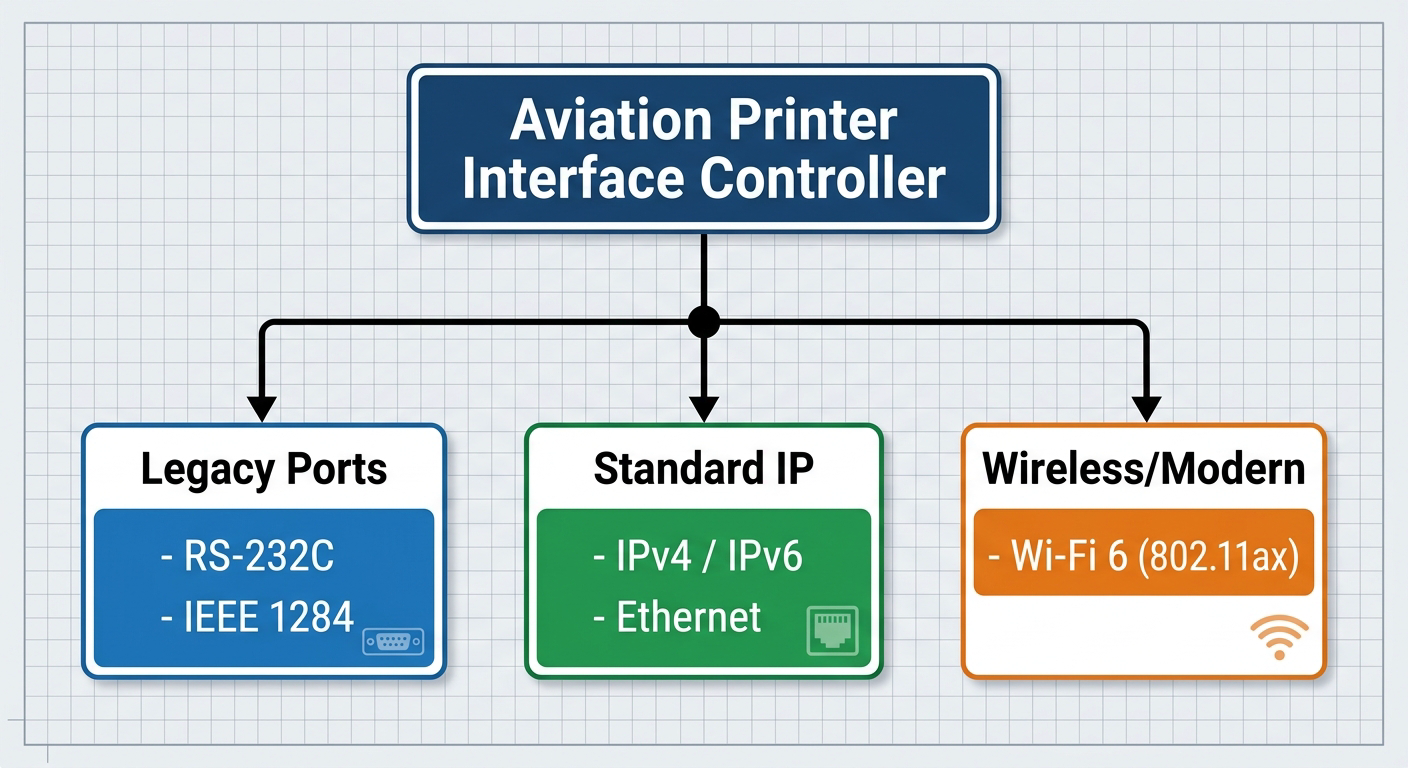
The Legacy Baseline: RS-232C
While consumer printing abandoned legacy ports twenty years ago, many airport gates still rely on physical RS-232C serial connections. Some say, that this is due to reliability issues. USB can be a fickle beast and isn’t always reliable.
- Serial interfaces must support configurable baud rates (typically from 9600 to 115200 bps) and hardware flow control (RTS/CTS) to prevent buffer overflows when processing dense multi-context print streams. Sometimes the hardware control is defined by the protocol framework and this must be taken into account when dealing with different vendor specifications.
The Modern Standard: Ethernet and IPv4/IPv6 Stack
Modern CUPPS environments favour network-attached printing.
- Dual-Stack IP: The printer’s network interface card (NIC) must fully support both IPv4 and IPv6 topologies, as many Tier 1 international airports have migrated entirely to IPv6 for device management.
- Network Protocol Security: While the print data itself is often raw text or binary wrapped in AEA protocols, the device management layer must be secure. Implement HTTPS for the embedded web configuration server, alongside SNMPv3 for remote fleet monitoring and asset tracking by airport IT departments.
Wireless and Mobility: The Rise of Mobile Invoicing
The industry is moving steadily toward “roving” agents who use mobile carts or tablets to check in passengers at hotels or at curbside drops.
- Enterprise Wi-Fi: If integrating a wireless module, it must support enterprise-grade security protocols (WPA3-Enterprise, 802.1X authentication) to comply with stringent airport network security policies.
- Low-Power Wake: The wireless sub-system must feature rapid reconnection algorithms to re-associate with the nearest access point instantly when a mobile cart moves between terminal dead zones.
- Static Wireless Devices: For printing devices in airports, wireless based communication is generally deemed to be unreliable. Where possible, a fixed ethernet port is recommended. This is due to the fact that there is a lot of radio noise in an airport environment.
7. Thermal Management and Mechanical Durability
A printer running 24/7 in an airport terminal is subject to mechanical wear and thermal stresses that would destroy a standard office machine.
Thermal Performance Under Continuous Load
During peak travel seasons (such as holiday rushes), a boarding pass or baggage tag printer might operate at a near 100% duty cycle for hours at a time.
- Heatsink Optimization: The thermal print head (TPH) requires an optimized aluminium or copper heatsink base to dissipate residual energy. If the TPH temperature exceeds safe operational thresholds, the firmware must introduce micro-pauses between prints to cool down, rather than shutting down completely and failing mid-transaction.
- Temperature Compensation: The firmware must dynamically adjust the electrical strobe time (the duration of the current pulse sent to individual heating dots) based on ambient temperature and historical dot usage. This keeps the print contrast uniform across both the first ticket and the five hundredth ticket and prevents bleeding when the print head hasn’t cooled down enough before moving on to the next step.
Industrial-Grade Mechanical Architecture
The physical chassis must be engineered for high impact and low component fatigue.
- Heavy-Duty Cutter Systems: Baggage tag stock is thick and often lined with heavy adhesives, while boarding pass stock is rigid card stock or rolled point of sale type stock. The integrated rotary or guillotine cutter must be rated for at least 1.5 to 2 million cuts before requiring maintenance. Self sharpening, treated steel blades are highly recommended to prevent premature dulling from adhesive build up.
- High-Torque Stepper Motors: Driving heavy, 8-inch outer diameter (OD) rolls of baggage tags through a tortuous media path requires industrial-grade stepper motors with high holding torque. The gear train should utilize reinforced nylon or metal gears rather than brittle plastics to prevent tooth stripping during sudden forward/reverse indexing manoeuvres.
8. Diagnostic Frameworks: Predictive Maintenance for Zero Downtime
When a printer stops working at a gate, it can take hours for an airport technician to arrive, diagnose, and repair the unit. To minimize this window, the device should actively predict its own failures.
Real-Time Telemetry and Sensors
Beyond the mandatory AEA Unsolicited Status reporting, your printer should feature an array of internal diagnostic sensors:
- Odometer Tracking: The firmware must log total inches/meters printed and total cuts executed in non-volatile memory (NVRAM). This data should be accessible via SNMP so airport IT can schedule preventative maintenance (such as roller replacements) before the hardware fails in the field.
- Adhesive and Dust Detection: Optical sensors monitoring the paper path should feature auto-calibration loops that can adjust their sensitivity as paper dust or adhesive residue accumulates over time, throwing a “sensor cleaning required” warning well before the sensor becomes completely blind.
Advanced Dot Failure Detection
As outlined in previous requirements, checking for print head dot failure on boot is essential. However, adding continuous inline resistance monitoring allows the printer to test the health of individual TPH heating elements between print jobs. If a cluster of adjacent dots fails, which would render a barcode unreadable, the printer can proactively flag an emergency status code to the platform, allowing the system to reroute printing to an adjacent workstation before a passenger is incorrectly processed.
Summary
By prioritizing these mechanical safeguards and legacy-compatible firmware protocols, you can deliver an aviation printer capable of surviving the rigorous demands of the modern airport terminal.
Pingback: Engineering for the Airport: A Guide to Designing Reliable Aviation Printers (Part 1) – Venalia Ltd.